On a retail shelf, packaging has a limited amount of time to make an impression. Customers may walk past dozens of products before stopping to examine one. A box that simply stores the product can do its job, but packaging designed specifically for display can do much more.
It can present the product at the right height, keep individual items organized, make important information visible, and encourage customers to interact with what they see.
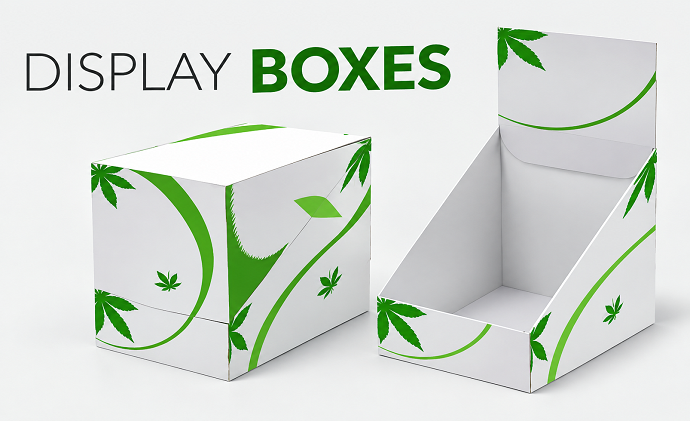
That is the purpose of Display Boxes. Instead of treating packaging and merchandising as two separate things, this format brings them together.
What Makes Display Packaging Different?
Traditional packaging is primarily designed to contain and protect a product. Display packaging has an additional responsibility: presentation.
It may include an open front, die-cut window, raised platform, compartments, or other structural elements that make the product easier to see.
This can be particularly useful for products sold in:
- Retail stores
- Convenience stores
- Beauty counters
- Pharmacies
- Gift shops
- Trade shows
- Promotional displays
The structure should make the product easier to notice without making it difficult for retailers to stock or customers to access.
Design Around the Product’s Best Feature
Before designing the box, identify what customers should notice first. For some products, it might be the packaging itself. For others, it could be the color, shape, texture, or physical design of the product.
The display structure should make that feature easy to see. A cosmetic product might benefit from an open front that reveals the shades. A food product could use a window to showcase the contents. A small accessory might need raised positioning so customers can see it without picking up the package.
Choose Between Open and Closed Display Structures
There is no single display format for every product.
Open-Front Display
An open front allows customers to see and access the product directly. This works well for products that benefit from browsing and easy removal.
Window Display
A transparent window protects the product while still allowing customers to see it.
Countertop Display
Countertop structures are useful for smaller products and impulse purchases. They can be positioned near checkout areas or other high-traffic locations.
Tiered Display
Multiple levels can make several products visible at once, particularly when the package contains different variations.
The best structure depends on the product, retail environment, and how customers are expected to interact with it.
Make the Product Visible From a Distance
A display box should work before the customer gets close enough to read every detail. Strong visual elements such as color, product imagery, shape, and logo placement can create recognition from several feet away. This is especially important in crowded retail environments.
The design should establish a clear visual hierarchy:
Brand first, product second, supporting information third.
The exact order may vary depending on the product, but the overall goal is quick recognition.
Make Information Easy to Scan
Customers rarely read every word on a package while standing in a store. Important information should therefore be easy to identify.
Depending on the product, this might include:
- Product name
- Main benefit
- Size or quantity
- Flavor or color
- Key ingredients
- Usage information
- Brand name
Use typography and spacing to separate the most important information from supporting details. A cluttered display can make even a good product difficult to understand.
Use Printing as Part of the Display
The box itself can become a branded advertising surface. With thoughtful custom product box printing, brands can place their visual identity directly around the product rather than relying entirely on separate signs or shelf displays.
The front can establish recognition, while side and back panels can provide additional information. Interior printing can also add branding when the customer interacts more closely with the display.
Add Windows Where They Actually Help
A window can be valuable when seeing the product increases confidence.
For example, customers may want to see:
- The actual color of a cosmetic
- The shape of an accessory
- The design of a gift item
- The appearance of a packaged food
- The quantity or arrangement of products
But a window should have a purpose.
If the product itself is not visually important, using a large window may simply reduce available branding space without adding much value.
Prototype Before Mass Production
Display packaging needs to be tested in a physical environment. Create a prototype and place it on a shelf or countertop at approximately the height where customers will see it.
Then check:
- Is the product visible?
- Is the branding readable?
- Does the box remain stable?
- Can customers access the product easily?
- Is it easy to restock?
- Does the display take up too much space?
A real-world test can reveal problems that are easy to miss in digital mockups.
Final Thoughts
Retail packaging cannot verbally explain the product to every shopper. Its structure, graphics, color, and information need to communicate quickly.
That is what makes Display Boxes different from ordinary product containers. They are designed not only to protect what is inside but also to help present it in the environment where purchasing decisions happen.
A well-planned custom product box can make the product easier to see, understand, handle, and remember. When structure and branding are designed around the real retail environment, packaging becomes more than a container. It becomes part of the merchandising strategy, helping products earn attention without relying on additional display materials.